A browser fingerprint can change because the browser changed, its privacy protections changed what a page can read, or the test measured something different. A new hash is not, on its own, evidence that you became anonymous. An unchanged hash is not, on its own, evidence that someone is tracking you across every website.
The useful question is narrower: which inputs changed, under what conditions, and does that behavior match the browser's documented design? This guide gives you a repeatable comparison method. For the underlying concepts, start with browser fingerprinting explained.
Compare the fields, not just the final identifier
A fingerprinting test can combine several observations into a hash: rendering output, supported APIs, language, time zone, screen information, and other browser properties. Changing one input can change the combined identifier. The identifier therefore tells you that the selected input set differed, but not which difference caused it.
The W3C's 2019 fingerprinting guidance describes both passive and active sources of identifying information. A test is a selection from that larger surface, not a complete inventory of every signal a website or its server could use.
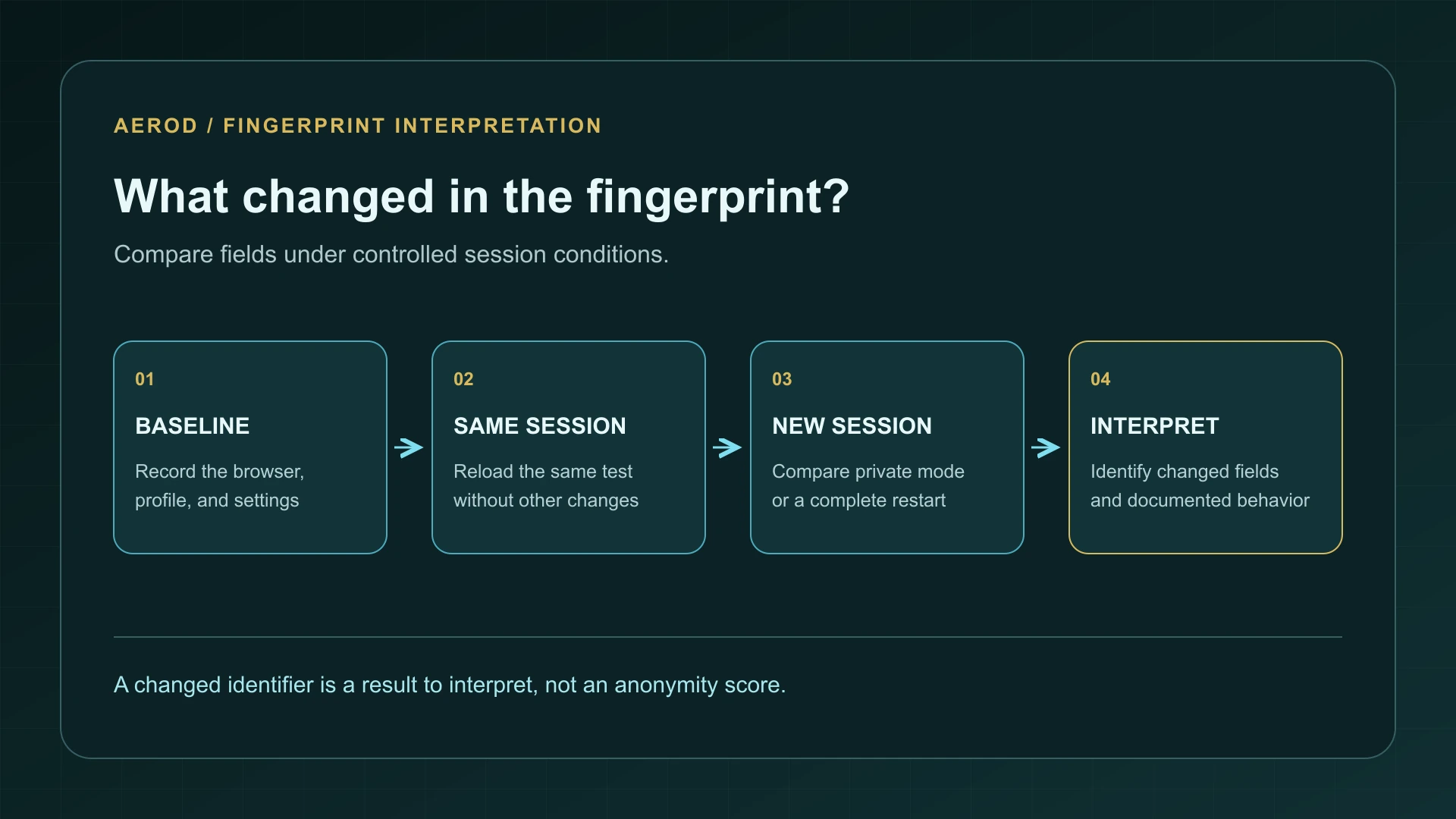
Prepare a useful baseline
Open Browser Fingerprint Check and record the browser name and version, profile, normal or private mode, and enabled privacy settings. Keep the same test URL and device throughout the first comparison. Wait for the test to finish before recording its result.
Write down the relevant changed fields rather than uploading an entire fingerprint report publicly. Reports can contain configuration details you did not intend to share. A small local note with the test time, condition, and changed category is enough for this investigation.
Keep the window size, display, language, and time zone unchanged for the first round. Do not update the browser, install an extension, change networks, and open a private window all at once. That would produce a difference without identifying its cause.
Use a four-part repeat test
On narrow screens, scroll the table horizontally.
| Test | Change only this | Question it answers |
|---|---|---|
| Same-tab reload | Reload after the first run completes | Are the measured fields stable within this page and session? |
| Second normal tab | Open the same URL in the same profile | Does a new document produce a different result without ending the browser session? |
| Private window | Use a private session and record its settings | Does a different storage or privacy context affect the output? |
| Browser restart | Quit the browser completely and reopen the same profile | Does a new browser session alter fields that were stable before? |
Closing one tab is not equivalent to quitting the browser. Likewise, two private windows may share a private browsing session while both are open. Record what you actually closed and reopened; do not assume a window boundary is the privacy boundary.
This matrix is a diagnostic procedure, not a promise that every browser must produce a different result in a particular row. Settings, implementation, and the test's selected fields determine the outcome.
Recognize deliberate randomization
Some privacy defenses intentionally perturb browser-readable values. Brave's March 2020 explanation of fingerprint randomization describes this approach for rendering-related measurements. It is different from simply deleting cookies or making every browser report the same value.
Brave's May 2020 technical explanation describes values derived from a per-session, per-site seed. That design can make a protected field repeat within one session while changing across sessions or sites. A stable same-tab result can therefore be compatible with a randomization defense.
Do not turn this into a universal rule about every field in Brave, every browser, or every fingerprinting test. A combined test identifier may include unprotected fields, stored state, or a different selection of inputs. Check the documentation for the actual protection you enabled.
Separate ordinary changes from privacy features
After the controlled session tests, repeat the baseline following one deliberate configuration change. For example, compare before and after disabling one optional extension in a separate test profile. Restore the setting afterward rather than leaving a collection of unexplained changes in your everyday browser.
On narrow screens, scroll the table horizontally.
| Changed category | Check first | Avoid concluding |
|---|---|---|
| Canvas, audio, or WebGL output | Documented protections, browser version, graphics or audio environment | That every change comes from a tracker or from successful protection |
| Screen or viewport measurements | Window geometry, display selection, scaling, and zoom | That moving to another display created a new anonymous identity |
| Language or time-zone fields | Browser and operating-system preferences | That an IP-location change automatically changed browser settings |
| Missing or unavailable fields | Blocked scripts, unsupported APIs, errors, or an incomplete run | That a shorter report necessarily means stronger privacy |
When several fields change after a software update, preserve that boundary in your notes. A before-update result and an after-update result are not a controlled test of a single privacy switch. The same applies if the test website changes its own measurement code.
Why different test sites disagree
Two tools may use different inputs, hashing rules, error handling, or comparison populations. Their identifiers need not match even when opened minutes apart. Compare repeated runs within the same tool before comparing the wording of two tools' privacy scores.
EFF's 2010 browser-uniqueness research examines both uniqueness and changes over time. Its results also illustrate why the population and method behind a measurement matter. A score based on visitors to one test is not a census of all internet users, and a changed fingerprint can sometimes remain linkable through other observations.
Turn the result into a decision
- Expected session-dependent changes: keep the documented protection and verify that the sites you need still work.
- Unexpected same-session changes: check incomplete runs, optional extensions, and the specific field before blaming the browser.
- Stable output: check whether the test measures fields the browser protects; do not immediately add more spoofing extensions.
- Broken pages after a setting change: reverse that change and compare again, using a narrowly scoped exception only when justified.
A browser permission audit addresses a different question: which sites can access particular capabilities. Keep those controls, account sign-ins, cookies, and network routing in view. Fingerprint consistency is one part of browser privacy, not a complete verdict.
FAQ
Does a different fingerprint mean I am anonymous?
No. It shows that the test's selected inputs or processing produced a different result. Accounts, cookies, network information, and other signals can still connect activity.
Should refreshing the page always change my fingerprint?
No. Some randomization defenses keep values stable within a session. Other fields may not be randomized at all.
Why do two fingerprinting websites give different results?
They can measure different inputs, combine them differently, and use different comparison populations. Compare repeat runs within one tool before comparing scores across tools.