Browser fingerprinting identifies or re-identifies a browser by combining observable characteristics: request headers, screen geometry, timezone, language, fonts, rendering behavior, media capabilities, storage support, permissions, hardware clues, and network context. A cookie blocker can stop many tracking scripts and stored identifiers, but it cannot make those characteristics disappear.
The practical problem is not that one screen size or one font reveals a person. It is that dozens of ordinary signals can combine into a profile that remains recognizable across sessions. W3C's current Group Note distinguishes passive fingerprinting, based on request-visible information, from active fingerprinting, where code runs in the browser to collect more characteristics. It also documents transient event correlation and cookie-like fingerprinting as distinct mechanisms.
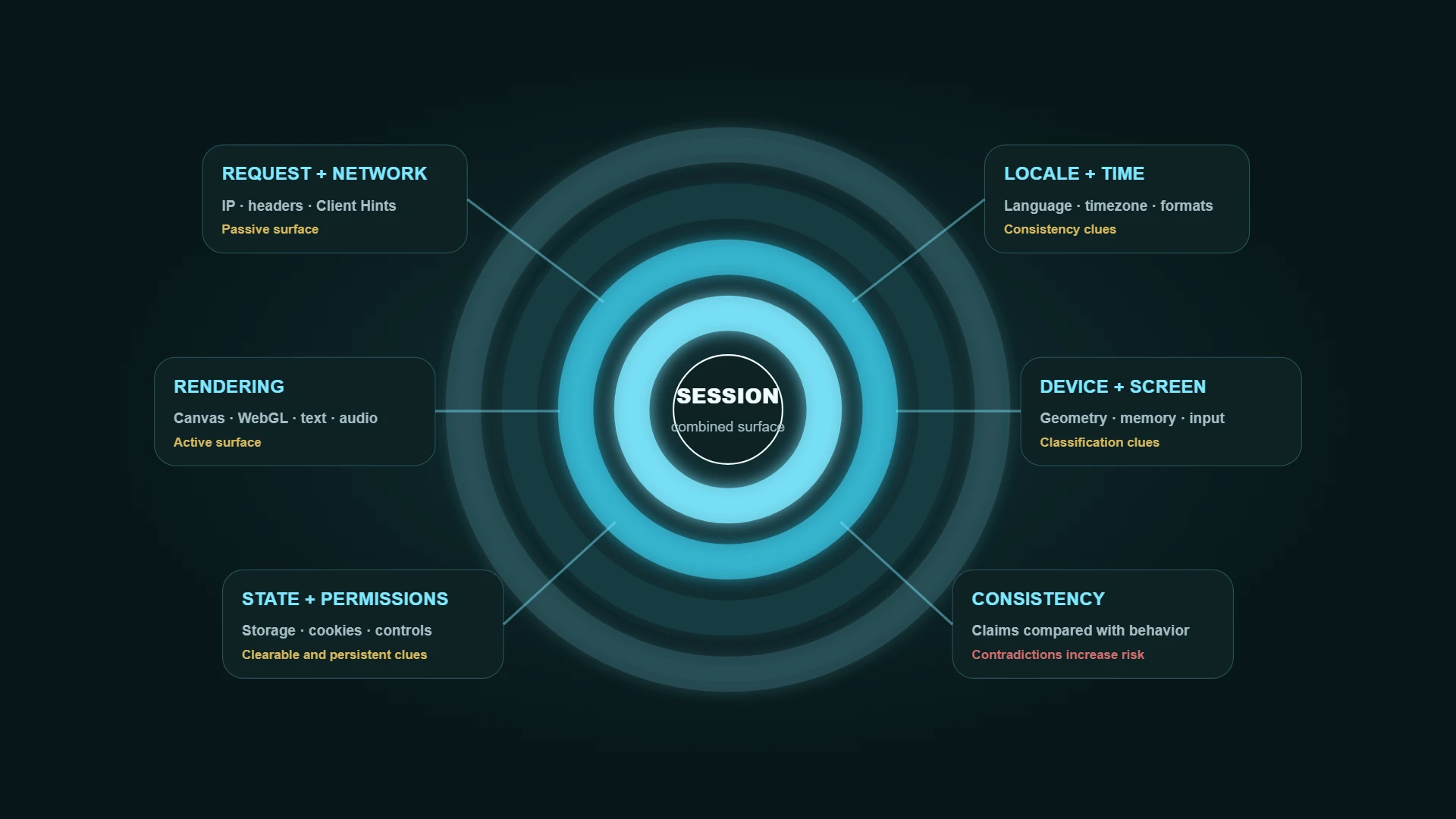
Browser fingerprinting in one table
| Layer | Common signals | Why the combination matters |
|---|---|---|
| Request and network | IP address, User-Agent, Client Hints, request headers | Narrows the browser, operating system, network, and region before scripts run |
| Locale and time | Language, timezone, date formats, preferred languages | Can expose regional mismatches or rare combinations |
| Screen and input | Screen size, viewport, pixel ratio, touch support, color depth | Adds device-class and display clues |
| Rendering | Canvas, WebGL, GPU renderer, text measurements, SVG, emoji | Hardware, drivers, fonts, OS, and browser can produce different output |
| Media and audio | AudioContext behavior, codecs, voices, media capabilities | Adds implementation and device-specific variation |
| Browser state | Cookies, local storage, permissions, privacy controls, extensions | Reveals persistence and configuration choices |
| Consistency | Contradictions between claimed and observed signals | Mismatches can make a profile more distinctive or suspicious |
Why cookie blockers fall short
Cookie tracking is usually stateful: a site stores an identifier and reads it again later. Browser fingerprinting can be stateless: the site reconstructs a recognition signal from characteristics exposed during the visit.
Deleting cookies removes stored state. It does not standardize the GPU renderer, change the timezone, normalize fonts, flatten Canvas output, or remove the IP address and request headers. Tracker blockers still matter because they stop many known scripts from loading, but they solve a different layer of the problem.
Passive and active fingerprinting
Passive fingerprinting
Passive fingerprinting uses information already present in network requests or protocol behavior. Examples include the IP address, User-Agent, Accept-Language, Client Hints, TLS-related characteristics, and other request metadata. A page does not need to run a complex script to receive this layer.
A VPN or proxy can change the IP and network route. It does not automatically change the browser headers or rendering surface.
Active fingerprinting
Active fingerprinting runs JavaScript, CSS, or other client-side logic to inspect the browser and device. It can measure rendering output, enumerate capabilities, inspect storage and permissions, test media behavior, or compare values for inconsistencies.
Active checks can be visible to browser protections and researchers, but they are also difficult to eliminate completely without reducing functionality. W3C describes fingerprinting mitigations as mitigations rather than complete solutions.
Transient correlation and cookie-like fingerprinting
W3C also describes transient event correlation, which links simultaneous sessions through near-simultaneous device or environment changes, and cookie-like fingerprinting, which uses retained state outside ordinary cookies to re-identify a browser. These mechanisms do not fit cleanly into a simple passive-versus-active split.
What privacy tools actually change
| Tool | Helps with | Does not solve by itself |
|---|---|---|
| Cookie and tracker blocker | Known tracking scripts, third-party requests, stored identifiers | First-party scripts, request metadata, and all fingerprintable browser characteristics |
| VPN | Public IP, local-network exposure, traffic between device and VPN | Canvas, WebGL, fonts, screen, account identity, cookies, browser settings |
| Proxy | App-specific IP route and location context | Other apps, browser consistency, DNS/WebRTC, storage, account history |
| Tor Browser | Tor routing plus browser changes designed to reduce fingerprinting | Identity disclosed through logins, unsafe behavior, or information intentionally shared |
| Browser profile separation | Cookies, storage, extensions, and session compartmentalization | Hardware and operating-system characteristics shared across profiles |
| Anti-fingerprinting protection | Reduces, blocks, or standardizes selected signals | Perfect prevention against every determined fingerprinting system |
How to check your browser fingerprinting surface
Use Aerod's Browser Fingerprint Check for a local session-level view of rendering, WebGL, audio, fonts, locale, storage, permissions, Client Hints, and consistency clues. The scan waits for you to start it and keeps its analysis in the browser. It can download a redacted or full technical JSON report; the full report can contain identifying browser details, so review it before sharing. Use the Browser Permissions & Privacy Settings Check to review storage, permissions, tracking controls, and practical fixes.
A useful test workflow is comparative:
- Run the fingerprint check in your ordinary browser profile.
- Save only the high-level findings you need; do not build a permanent identity record.
- Run it in a clean profile or another browser.
- Compare which signals changed and which remained stable.
- Make one privacy change at a time and retest.
- Check the network layer separately with IP Lookup and Proxy/VPN Detection.
EFF's Cover Your Tracks is another useful external reference for seeing how tracking protections and browser uniqueness can be evaluated. It is an external test that says it collects anonymous test data, so review its privacy information before running it. No single test represents every tracker or site.
If repeat tests produce different identifiers, first work out why your browser fingerprint changes between tests. A controlled comparison of individual fields is more useful than treating a changing hash as an anonymity score.
If the immediate problem is repeated verification prompts, follow the recurring CAPTCHA troubleshooting steps. A fingerprint result alone cannot identify why a particular site is challenging the session.
What actually reduces fingerprinting risk
Prefer coherent browser profiles
A stable, ordinary profile is often easier to reason about than a heavily customized profile with conflicting signals. Keep language, timezone, operating-system hints, and the intended network route consistent when that matters to the workflow.
Reduce unnecessary extensions
Extensions can change headers, page behavior, exposed APIs, content, and timing. Keep only the extensions you understand and use. A large or unusual extension set can create more variation even when individual extensions improve privacy.
Use built-in privacy protections
Modern browsers increasingly reduce or standardize fingerprintable data. Firefox documents blocking known fingerprinting scripts and limiting selected values exposed to suspected fingerprinters. Tor Browser uses coordinated defenses such as letterboxing, standardized User-Agent values, font limits, and first-party isolation to place users into larger groups. Built-in protections are generally easier to keep coherent than a pile of independent spoofing tools.
Separate identities by profile or browser
Use separate profiles for unrelated accounts, research, work, and testing. Compartmentalization reduces cookie and storage crossover even though the profiles may still share hardware-level signals.
Avoid random spoofing without a model
Changing values randomly can create impossible combinations: one operating system in the User-Agent, another in Client Hints, a timezone from a third region, and rendering output that contradicts all of them. Prefer well-tested browser protections over ad hoc spoofing.
Browser fingerprint reduction checklist
- Use a current browser with maintained privacy and security protections.
- Remove extensions you do not need or cannot explain.
- Keep browser language, timezone, platform, and network context coherent.
- Use separate profiles for unrelated accounts and research contexts.
- Do not rely on cookie deletion as the only anti-tracking measure.
- Avoid random fingerprint spoofing that creates contradictory values.
- Retest after browser, extension, display, GPU, or privacy-setting changes.
Why websites use fingerprinting
Fingerprinting is used for more than advertising. The same characteristics can support fraud detection, bot detection, account security, abuse prevention, analytics, and authentication. That dual use is why the privacy question cannot be answered by labeling every fingerprinting signal as malicious.
The important questions are whether the collection is necessary, proportionate, disclosed, retained, shared, and used in a way the user can understand or control.
Can fingerprinting be eliminated?
A determined site can often observe enough behavior and configuration to distinguish browsers, especially when functionality exposes high-entropy details. W3C's guidance says complete elimination through widely deployed technical means is implausible, but meaningful mitigation is still possible: minimize unnecessary entropy, standardize values, limit API access, make active collection detectable, and keep clearable state clearable.
Methodology
How to interpret a fingerprint result
- Treat the result as a session-level estimate, not a permanent identity.
- Separate request-visible signals from active browser measurements.
- Look for unusual combinations and contradictions rather than one scary value.
- Compare profiles and browsers under the same network conditions.
- Reduce unnecessary exposure without breaking the browser into an implausible configuration.
- Retest after changes and document only what is needed for the decision.
FAQ
Does deleting cookies remove a browser fingerprint?
No. It removes stored cookie state, but fingerprinting can reconstruct recognition from request headers, rendering, fonts, screen, locale, capabilities, and other observable characteristics.
Does a VPN stop browser fingerprinting?
No. A VPN changes the network route and public IP. The browser can still expose rendering, device, locale, storage, and configuration signals.
Is a unique fingerprint automatically dangerous?
Not by itself. Uniqueness increases the possibility of recognition, but actual tracking also depends on who collects the signals, how long they are retained, and whether they are linked across sites or accounts.
Should I try to change my fingerprint every session?
Not blindly. Uncoordinated randomization can create unstable or contradictory profiles. Use maintained browser protections and compartmentalized profiles instead of changing individual values without understanding the result.
Is the Browser Fingerprint Check the same as the Browser Permissions & Privacy Settings Check?
No. The fingerprint check concentrates on characteristics that can contribute to recognition. The permissions and privacy settings check reviews browser identity hints, locale, storage, permissions, tracking controls, and practical fixes. It does not gather WebRTC candidates or run the deeper fingerprint test.