Hiding your IP address changes the network address a website sees. It can reduce simple location tracking, separate a browsing session from a home or workplace connection, and help you test how a service behaves from another region. It does not erase cookies, browser fingerprints, account history, device signals, or everything an internet provider or app can observe.
The right method depends on the job. A VPN is usually the easiest device-wide option. A proxy is better for one app or workflow. Tor Browser is designed for stronger anonymity properties at the browser layer. Apple Private Relay protects eligible Safari traffic, while switching networks only replaces one visible IP with another.
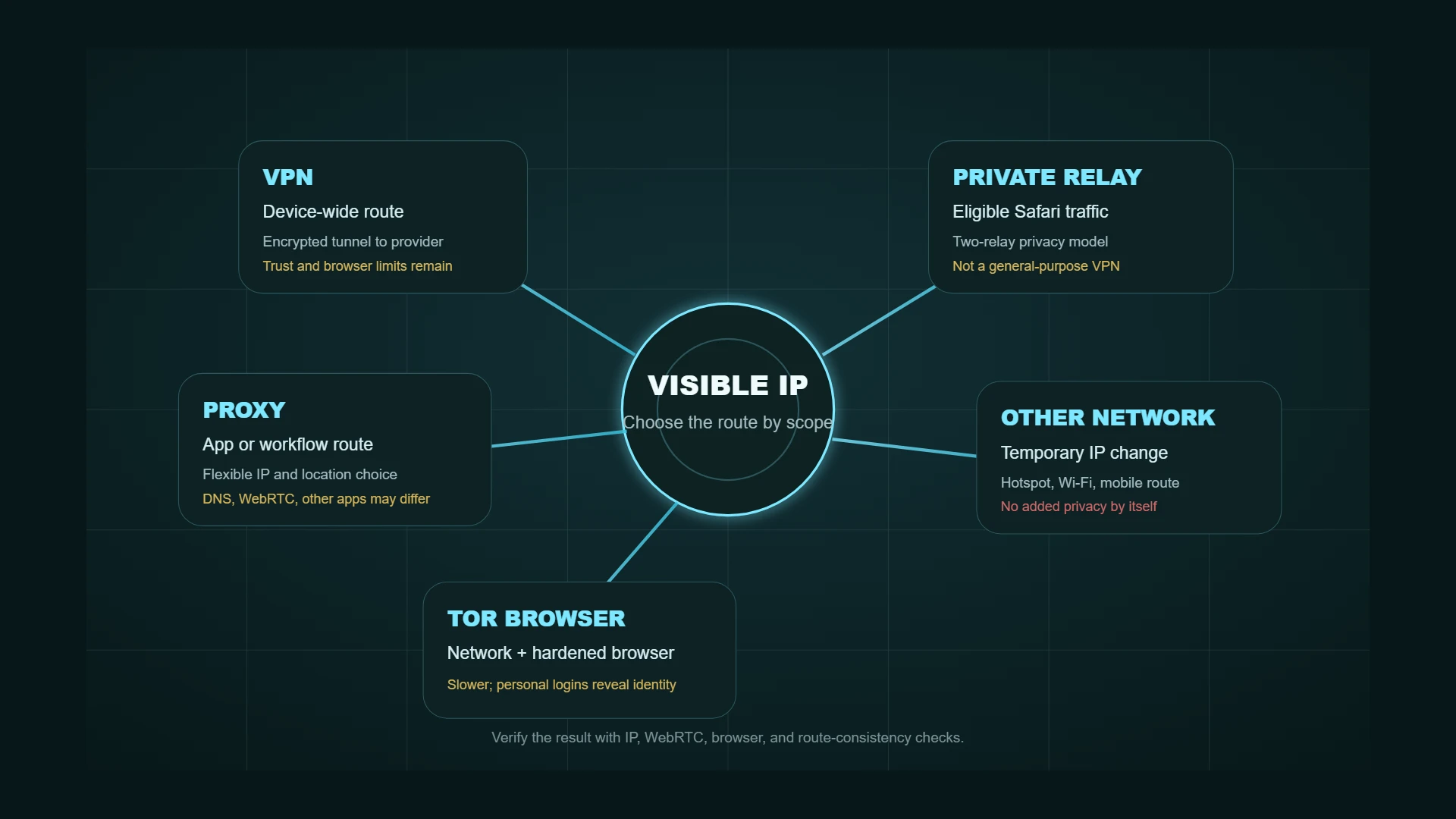
Quick comparison
| Method | What changes | Encryption and scope | Best fit | Main limitation |
|---|---|---|---|---|
| VPN | Websites see the VPN server IP | Usually encrypts traffic between the device and VPN; often device-wide | Everyday privacy, public Wi-Fi, travel, general location changes | Requires trust in the VPN provider; browser tracking still works |
| Proxy | The target app or request uses the proxy IP | Often app-specific; encryption depends on protocol and destination | Browser profiles, app routing, testing, research workflows | Other apps can remain direct; DNS and WebRTC can disagree |
| Tor Browser | Websites see a Tor exit IP | Traffic is routed through the Tor network inside a hardened browser | Higher-risk browsing and stronger compartmentalization | Slower, more blocks and CAPTCHAs, not suited to every account workflow |
| iCloud Private Relay | Eligible Safari traffic uses a temporary IP | Primarily Safari browsing plus DNS protection on supported Apple devices | Low-friction Safari privacy for iCloud+ users | Not a general-purpose VPN and not available everywhere |
| Different network | Websites see the hotspot, mobile, or public network IP | No added privacy unless another protection is used | Short tests and temporary route changes | The new network can observe traffic metadata; public Wi-Fi adds risk |
| Smart DNS | Usually leaves the public IP unchanged | Redirects selected DNS lookups; no general traffic encryption | Region-specific media compatibility | It is not an IP-hiding or privacy tool |
1. Use a VPN for device-wide privacy
A virtual private network routes traffic through a VPN server and replaces the public IP visible to most destinations with the server's IP. The tunnel also protects traffic between your device and the VPN service, which is useful on public Wi-Fi and other networks you do not control.
A VPN is the most practical default when you want one connection layer for normal browsing, travel, public Wi-Fi, or general location masking. It is less appropriate when you need a different route for only one program, or when the threat model requires avoiding a single commercial provider as the trust point.
Advantages
- Covers more device traffic than a browser-only proxy in typical configurations.
- Encrypts the connection between the device and VPN server.
- Usually includes server selection, kill-switch controls, and DNS handling.
- Is easier for most users to operate than per-app proxy rules.
Tradeoffs
- The provider can become an important trust point.
- Split tunneling, DNS settings, or app-specific behavior can leave traffic outside the tunnel.
- Websites can still identify accounts and fingerprint browsers.
- Distant or overloaded servers can increase latency.
For a provider-oriented comparison, use Aerod's VPN services guide. Current commercial options with Aerod disclosures include NordVPN paid linkPaid link. Aerod may earn a commission if you purchase or sign up through this NordVPN link., Proton VPN paid linkPaid link. Aerod may earn a commission if you purchase or sign up through this Proton VPN link., and Surfshark paid linkPaid link. Aerod may earn a commission if you purchase or sign up through this Surfshark link.. Choose from documented features and your own threat model rather than treating any provider name as a privacy guarantee.
2. Use a proxy for one app or workflow
A proxy is an intermediary for selected traffic. A browser, scraper, desktop app, or command-line tool sends a connection to the proxy, and the destination sees the proxy's IP instead of the original route.
Proxies are useful when you need application-specific routing, a stable ISP address, a rotating residential pool, a low-cost datacenter route, or a mobile carrier exit. They are not automatically encrypted, and a browser proxy may leave other apps, DNS requests, or WebRTC behavior on a different path.
Use the proxy type selector before buying a provider. After setup, open IP Lookup and What's My IP in the exact browser or app path you intend to use. If the route matters, also run the WebRTC Leak Test and Proxy/VPN Detection.
3. Use Tor Browser when the browser itself must resist correlation
Tor Browser routes browsing through the Tor network and includes browser changes intended to reduce tracking and fingerprinting. The Tor Project strongly recommends using Tor through Tor Browser rather than connecting an ordinary browser to Tor, because a normal browser can reveal identifying information through DNS, WebRTC, fonts, plugins, cookies, cache, and other fingerprinting surfaces.
Tor is a stronger fit when the goal is compartmentalized browsing with a browser designed around the network. It is usually slower than a commercial VPN, and some sites block Tor exits or demand additional verification. Logging into personal accounts can also reveal identity regardless of the route.
For the practical differences, read VPN vs Tor.
4. Use iCloud Private Relay for eligible Safari traffic
Apple describes iCloud Private Relay as a two-relay system for eligible Safari browsing. The first relay can see the user's IP but not the destination, while the second relay supplies a temporary IP and connects to the site. Apple also states that DNS records are protected in the process.
Private Relay is useful when you already use Safari and iCloud+ and want low-friction IP protection without running a conventional VPN. It is not a general replacement for a device-wide VPN: availability varies, some sites or networks require the IP to be visible, and the scope is centered on supported Apple browsing traffic.
5. Understand why Smart DNS does not hide your IP
Smart DNS can help certain services return region-specific content by changing where selected DNS requests are resolved. It generally does not replace the public IP websites see and does not encrypt normal traffic. Use it as a compatibility tool, not as an anonymity or IP-masking method.
6. Switching networks changes the IP, not the tracking surface
A mobile hotspot, hotel network, café Wi-Fi, or another household connection can give you a different public IP. That can be useful for troubleshooting and regional testing, but it is not a privacy system. The new network can still observe connection metadata, and an untrusted public network creates its own risks.
Use HTTPS, avoid sensitive tasks on unknown networks, and use a trusted VPN when the network itself is part of the threat model.
7. Understand niche and emerging methods
Several other techniques can replace or obscure the visible IP, but each has a narrower purpose or a less mature trust model:
- Decentralized VPNs and mix networks distribute routing across multiple operators or participants. They can reduce dependence on one provider, but performance, auditing, incentives, software maturity, and exit-node trust vary by project.
- Browser-based relay features can hide IP addresses for selected browser traffic. Treat them according to their documented scope rather than assuming device-wide coverage.
- Remote desktops, virtual private servers, and hosted workstations make websites see the remote machine's IP. The hosting provider, remote operating system, browser profile, and account activity remain part of the trust model.
- Rotating proxy services change exit IPs automatically and are useful for permitted data collection or regional testing. Rotation can break logins and does not make a browser profile anonymous.
Choose these methods only when their specific architecture solves a real requirement. A more complicated route is not automatically a safer route.
If repeated verification prompts are the problem, see why CAPTCHAs keep appearing and what to check. Comparing one browser or network condition at a time helps distinguish recurring challenges from a verification flow that cannot finish.
How to verify that your IP is hidden
Run the checks from the same browser profile and application path you will actually use:
- Open IP Lookup and What's My IP before connecting and record the visible IP, ASN, organization, and approximate location.
- Connect the VPN, proxy, Tor Browser, Private Relay, or alternate network.
- Reload the IP tool and confirm the route changed as expected.
- Run the WebRTC Leak Test to review browser connection candidates.
- Use Proxy/VPN Detection to compare route context with timezone, DNS, WebRTC, and browser expectations.
- Use the Browser Permissions & Privacy Settings Check when storage, permissions, locale, and browser-side exposure matter.
IP-masking verification checklist
- Verify the public IP from the exact browser or app that will use the route.
- Check whether the visible ASN and location match the expected VPN or proxy server.
- Test WebRTC after changing VPN, proxy, or browser settings.
- Confirm the browser timezone and language make sense for the intended workflow.
- Check for split tunneling, direct app traffic, or proxy rules that bypass the route.
- Use a separate browser profile when account or cookie separation matters.
- Do not treat a changed IP as proof that the entire device is private.
Which method should you choose?
Methodology
Choose by scope and threat model
- Choose a VPN for the simplest device-wide privacy and public-Wi-Fi protection.
- Choose a proxy when one app, browser, region, or proxy class needs a separate route.
- Choose Tor Browser when a browser specifically designed for the Tor network fits the task.
- Choose Private Relay when eligible Safari traffic is the scope and the Apple ecosystem fits.
- Use another network only as a temporary route change, not as a privacy guarantee.
- Verify every setup with IP, WebRTC, browser, and route-consistency checks.
FAQ
Does Incognito mode hide my IP address?
No. Private-browsing modes mainly reduce what the browser saves locally after the session. Websites and network providers can still see the network connection unless a VPN, proxy, Tor, Private Relay, or another route changes it.
Does a VPN hide my IP from my internet provider?
A VPN changes the IP seen by destination websites. Your internet provider can still see that your device is communicating with a VPN service, along with timing and traffic-volume information, but not the ordinary destination traffic inside a correctly configured encrypted tunnel.
Can a proxy hide my IP from every app?
Only if every relevant app is configured to use the proxy or a routing tool sends their traffic through it. Browser proxy settings do not automatically cover other applications.
Is Tor better than a VPN?
They solve different problems. Tor Browser is designed around multi-hop anonymity and browser uniformity. A VPN is usually faster and easier for everyday device traffic. The better choice depends on the threat model and whether personal accounts, speed, browser isolation, or provider trust matter most.
Can a website still track me after my IP changes?
Yes. Accounts, cookies, browser fingerprints, storage, link identifiers, and behavior can continue to connect sessions. Use the Browser Fingerprint Check to inspect the browser layer separately.