ERR_TUNNEL_CONNECTION_FAILED means Chrome reached a proxy, asked it to open a tunnel to the website with an HTTP CONNECT request, and the proxy did not return a usable success response. The proxy itself is reachable; the tunnel request failed. Find out which proxy Chrome is using, read the proxy's actual response outside the browser, and fix that specific refusal. Clearing the cache rarely helps.
This guide is based on Chromium's source code and documentation and on the HTTP specification. It is not an Aerod lab test of a particular proxy service. Error meanings are quoted from Chromium's network error list as of 23 October 2026.
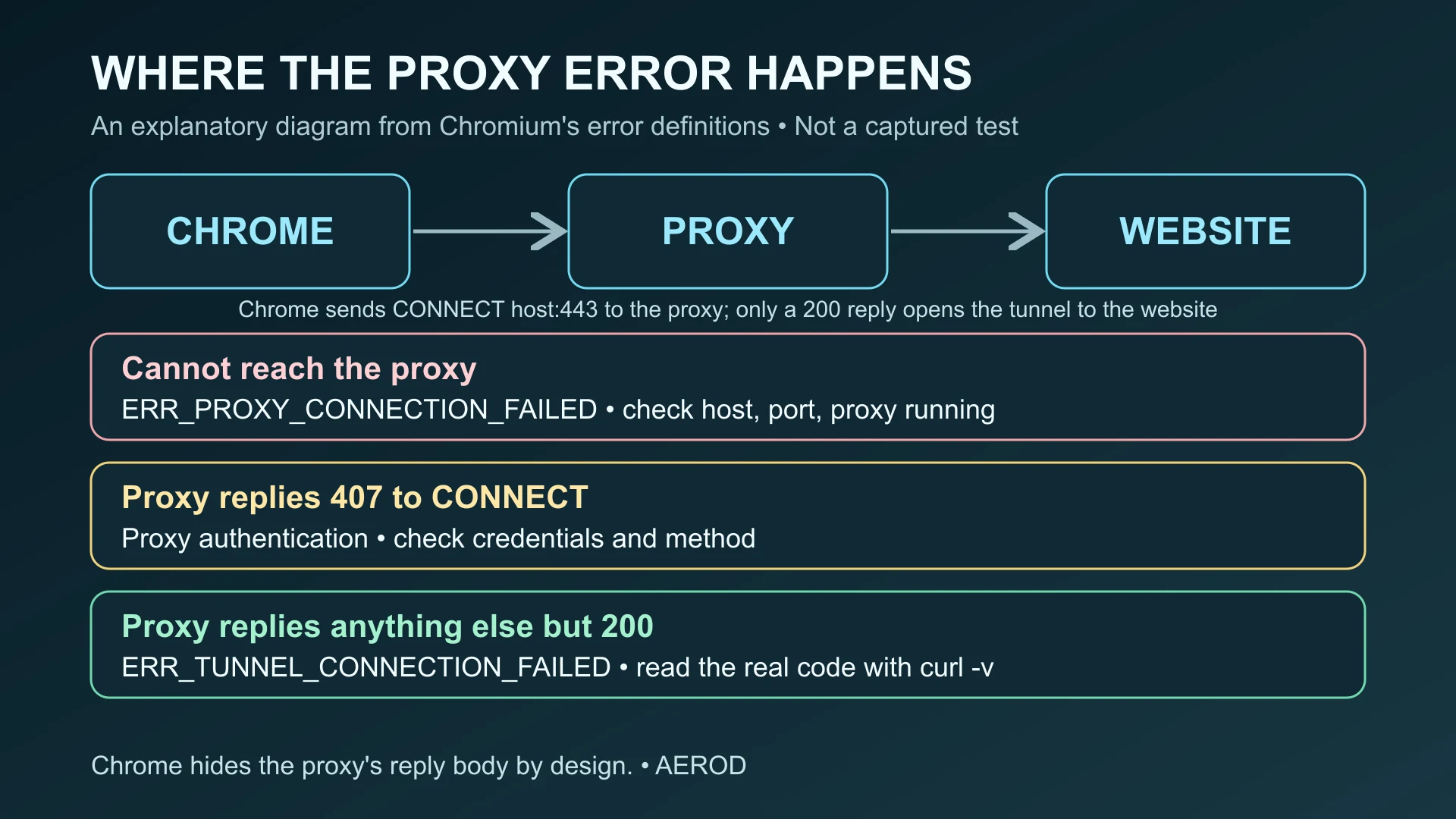
What the error means, and what it does not
HTTP's CONNECT method asks a proxy to open a tunnel to a host and port, typically example.com:443 for HTTPS. A 2xx response means the tunnel is open. Chromium's own error list separates three nearby failures:
On narrow screens, scroll the table horizontally. Keyboard users can focus the table region and use the arrow keys.
| Chrome error | Chromium's definition | Check first |
|---|---|---|
ERR_PROXY_CONNECTION_FAILED (-130) | Could not create a connection to the proxy server, either resolving its name or connecting a socket. Excludes failures during the CONNECT request. | Proxy address, port, and whether the proxy is running |
ERR_TUNNEL_CONNECTION_FAILED (-111) | A tunnel connection through the proxy could not be established. | The proxy's response to CONNECT: policy, destination, protocol, account |
407 / ERR_PROXY_AUTH_UNSUPPORTED (-115) | The proxy requested authentication, or requested it with an unsupported method. | Proxy credentials and authentication method |
So the website is usually not the first suspect. The proxy answered, and its answer was not "tunnel open". It may have refused the destination, failed to reach it, rejected your account or IP address, or not understood the request.
Why Chrome does not show the real reason
In Chromium's HTTP proxy client, a CONNECT response of 200 opens the tunnel and 407 starts proxy authentication. Every other status code is converted to ERR_TUNNEL_CONNECTION_FAILED, and the proxy's response body is deliberately ignored. The code comment explains that showing the body would let a proxy impersonate the target website. It also notes the trade-off: proxies such as Squid can return a 404 page explaining that a domain name does not exist, and Chrome discards it.
Chrome also returns this error when a proxy sends a malformed status line, or extra data after a 200 response. In practice, you need a tool that shows the proxy's raw reply.
Step 1: Find which proxy Chrome is using
According to Chromium's proxy documentation, Chrome's proxy settings can come from four places:
- Managed policy: check
chrome://policyfor proxy policies set by an organization. - Command-line flags, such as
--proxy-server, in a shortcut or launcher. - Extensions that use the proxy API. VPN and proxy-switcher extensions are common examples. Disable them one at a time to test.
- System proxy settings: on Windows, Settings → Network & internet → Proxy; on macOS, the proxy settings for the active network service. Leftover settings from an uninstalled VPN or proxy tool belong here.
Write down the proxy host, port and type. If you never meant to use a proxy, turn off the stray setting and retest. That alone fixes many cases on personal computers.
Step 2: Read the proxy's real response with curl
Send the same CONNECT request with curl, which ships with Windows 10 and later, macOS and most Linux distributions. Use a harmless test destination first, then the site that failed:
curl.exe -v -x http://PROXY_HOST:PORT https://example.com/ -o NULType curl.exe on Windows, because in Windows PowerShell curl can be an alias for a different command. On macOS or Linux, use curl and replace NUL with /dev/null. Add --proxy-user USER if the proxy needs credentials, and remove credentials from any output you share. In the verbose output, find the line after CONNECT example.com:443, such as HTTP/1.1 403 Forbidden. curl reports a failed tunnel as "CONNECT tunnel failed, response 403", which gives you the status code Chrome hid.
Inside Chrome, you can record a NetLog at chrome://net-export and open it in the NetLog viewer. Chromium's proxy documentation recommends this for proxy problems. The capture shows the resolved proxy list and any proxies Chrome marked as bad. It can contain sensitive URLs and cookies, so share it only with people you trust.
What the CONNECT status code usually means
| Proxy response | Likely cause | What to do |
|---|---|---|
403 Forbidden | Proxy policy refuses the destination or port, or your IP address is not on the provider's allowlist | Check the provider dashboard's IP allowlist and destination rules, or ask the network administrator |
407 repeated | Wrong or missing proxy credentials | Follow the 407 Proxy Authentication Required guide |
404, 502, 503, 504 | The proxy could not resolve or reach the destination, or its upstream is down or overloaded | Test another destination through the same proxy. If every destination fails, the proxy side is at fault. |
400, 405, 501 | The endpoint does not accept CONNECT. A common cause is a SOCKS port configured as an HTTP proxy. | Confirm the protocol and port in the provider's documentation |
429 | Rate, session or concurrency limit (RFC 6585) | Reduce parallel connections or check plan limits |
| No HTTP response, connection reset | A firewall, antivirus HTTPS scanning or a middlebox is interrupting the tunnel | Retest on another network or with HTTPS scanning paused |
These are the usual causes, not guarantees. Proxy products can use status codes differently, so check your proxy's documentation or logs for the exact code you see.
Fixes by situation
You did not intend to use a proxy
- Turn off the system proxy and "Automatically detect settings" only if your network does not require them.
- Disable proxy or VPN browser extensions one at a time.
- Remove
--proxy-serverfrom Chrome shortcuts. - Open
chrome://net-internals/#proxyand use the buttons that re-apply settings and clear bad proxies. Chromium's documentation notes the page gives no confirmation that bad proxies were cleared.
You use a paid proxy service
- Confirm the endpoint type: an HTTP(S) proxy for Chrome's normal proxy setting, not a SOCKS-only port. SOCKS5 vs HTTPS proxies explains the difference.
- Check the IP allowlist, username format and any session or country parameters.
- Check that the plan still has bandwidth and that the destination or port is permitted.
- Read the CONNECT status with curl before contacting support, and include it in your ticket.
You are on a work or school network
A 403 to a CONNECT request usually reflects an intentional policy. Contact the administrator with the time, destination and status code. Do not try to bypass the policy.
What not to do
- Do not turn off certificate checks or install unknown root certificates to "fix" a tunnel error. The failure happens before TLS reaches the website.
- Do not switch to a random free proxy list. See free vs paid proxies for the risks.
- Do not post proxy passwords, NetLogs or verbose curl output publicly without redacting them.
Verify the fix
Reload the page that failed, then check which address websites see using Aerod IP Lookup. If you meant to use the proxy, the IP should be the proxy's exit address. If you removed a stray proxy, it should be your normal connection. If a desktop application has a similar error, the Proxifier troubleshooting guide covers rule and process checks.
FAQ
What is the difference between ERR_TUNNEL_CONNECTION_FAILED and ERR_PROXY_CONNECTION_FAILED?
ERR_PROXY_CONNECTION_FAILED means Chrome could not connect to the proxy at all. ERR_TUNNEL_CONNECTION_FAILED means Chrome reached the proxy, but the proxy did not open the tunnel to the website.
Why does Chrome not show the proxy's error message?
Chromium deliberately ignores the body of any CONNECT response other than 200 or 407, so a proxy cannot impersonate the website. Use curl in verbose mode or a NetLog to see the actual status code.
Can clearing the browser cache fix ERR_TUNNEL_CONNECTION_FAILED?
Rarely. The failure happens between Chrome and the proxy before the website is contacted. Check the proxy settings, credentials, allowlist and the proxy's CONNECT response first.
Does ERR_TUNNEL_CONNECTION_FAILED mean the website is down?
Not necessarily. A 502 or 504 from the proxy can mean it could not reach the site, but a 403 or 407 points to the proxy's policy or your account. Test another destination through the same proxy to tell them apart.