To check whether you are behind CGNAT, compare the WAN IP address your router reports with the public IP address an IP lookup shows. If they are different, or the router’s WAN address falls between 100.64.0.0 and 100.127.255.255, your internet provider is very likely using carrier-grade NAT. This guide walks through that check, a traceroute to confirm it, what CGNAT breaks, and the realistic ways around it.
CGNAT does not stop normal browsing, streaming or gaming as a client. It matters when something on the internet needs to reach you: port forwarding, hosting a game or media server, remote access to cameras or a NAS, and incoming peer-to-peer connections.
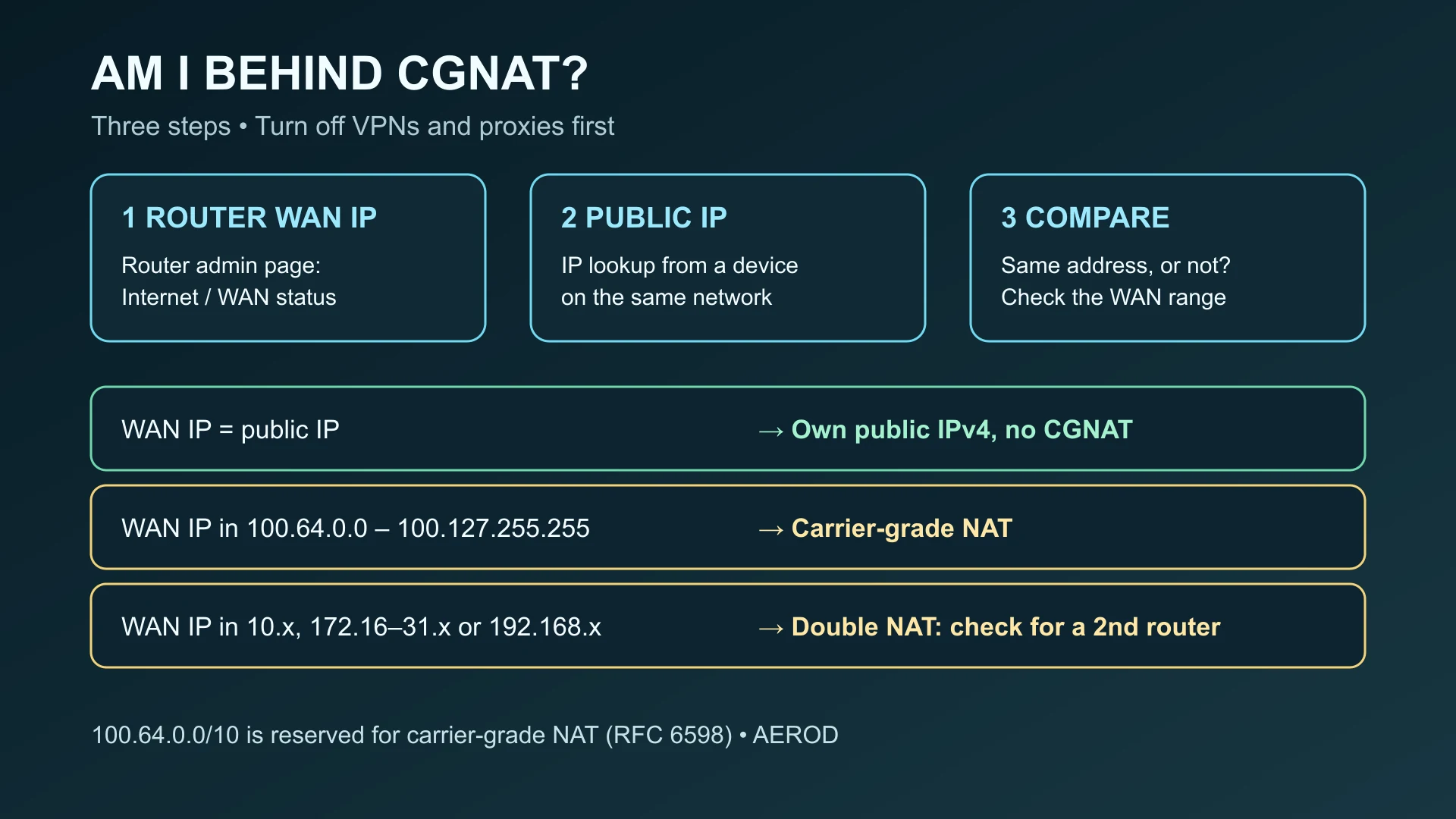
The quick check: router WAN IP vs public IP
- Find your router’s WAN IP. Open the router’s admin page (often printed on its label) and look for a status page called Internet, WAN, Connection or Broadband. Note the IPv4 address shown there, not the local LAN address such as
192.168.1.1. - Find your public IP. Turn off any VPN or proxy, then open IP Lookup on a device connected to that router and note the IPv4 address it shows.
- Compare the two using the table below.
| Router WAN IP | What it means | Next step |
|---|---|---|
| Same as the public IP | You have your own public IPv4 address. You are not behind CGNAT. | Port forwarding on your router can work. |
In 100.64.0.0–100.127.255.255 | Shared address space reserved for carrier-grade NAT (RFC 6598). You are behind CGNAT. | See the workarounds below. |
In 10.x.x.x, 172.16.x.x–172.31.x.x or 192.168.x.x | Double NAT: another router sits in front of yours. It may be your ISP’s modem-router, or the ISP’s own NAT. | Check for a second router first (below). |
| A public address that differs from the lookup | Usually a VPN, proxy or corporate gateway is still active, or the router status is stale. | Disable VPNs and proxies, refresh the router status and compare again. |
The address ranges are explained in more detail in public vs private IP addresses. The 100.64.0.0/10 block is defined in RFC 6598; the private blocks are in RFC 1918.
If the WAN IP is 10.x, 172.16–31.x or 192.168.x
A private WAN address means something upstream is translating your traffic. Before blaming the provider, check whether your own equipment is doing it:
- ISP modem-router plus your own router: if the provider’s box is also a router, your router sits behind it. Log in to the provider’s box; if its WAN address is public and matches the IP lookup, you have double NAT at home, not CGNAT. Bridge mode on the provider’s box, or forwarding the ports on both devices, usually fixes it.
- Only one router, still a private WAN address: some providers run carrier-grade NAT with private addresses instead of the
100.64.0.0/10block. Treat it like CGNAT and confirm with the traceroute below or with your provider.
Confirm with a short traceroute
A traceroute shows the first few routers your traffic passes through. Run it with VPNs and proxies turned off:
- Windows (Command Prompt):
tracert -d -h 5 1.1.1.1 - macOS or Linux (Terminal):
traceroute -n -m 5 1.1.1.1
The first hop is your own router, usually a 192.168.x.x or 10.x.x.x address. If the second or third hop is in 100.64.0.0–100.127.255.255, that is a strong sign of carrier-grade NAT. A private address in those hops is less conclusive, because some providers use private addresses inside their network without CGNAT, so the WAN comparison above remains the main test. Hops that show * simply did not answer and do not prove anything either way.
Mobile, 5G and fixed-wireless connections
Mobile networks, including phone hotspots and 4G or 5G home routers, very commonly put customers behind carrier-grade NAT, and some fixed-wireless and satellite services do too. On these connections, the device or router usually shows a 10.x or 100.64.x address while the IP lookup shows a different, shared public address. Plans that include a public or static IPv4 address are often sold separately.
Check whether you also have IPv6
CGNAT applies to IPv4. If IP Lookup also shows a public IPv6 address, devices on your network may be reachable over IPv6 even though IPv4 is shared, as long as your router’s firewall allows the inbound traffic. Whether that helps depends on the other side: the client connecting to you also needs working IPv6.
What CGNAT breaks, and what it does not
| Task | Behind CGNAT |
|---|---|
| Browsing, streaming, video calls, online games as a player | Works normally |
| Port forwarding, UPnP or NAT-PMP on your router | Has no effect beyond your router; the provider’s NAT still blocks unsolicited inbound traffic |
| Hosting a game server, media server, NAS or self-hosted site | Not reachable from the internet over IPv4 |
| Remote access to cameras or smart-home hubs | Works only through the vendor’s cloud relay or a tunnel |
| Peer-to-peer and torrent clients | Outgoing connections work; incoming connections fail, so clients often report “not connectable” or firewalled |
| Websites and services that rate-limit by IP | The shared public IP may carry other customers’ traffic, which can mean more CAPTCHAs or blocks |
Shared public addresses also explain two related problems: frequent CAPTCHAs and an IP location that looks wrong, because the shared address may be registered to a provider gateway in another city. RFC 7021 describes these effects of carrier-grade NAT in more detail.
How to get around CGNAT
- Ask your provider for a public IPv4 address. Many providers will move a line off CGNAT on request, sometimes for a fee or as part of a static-IP add-on. This is the cleanest fix for hosting and port forwarding.
- Use IPv6 where both ends support it, and open only the ports you need in the router’s IPv6 firewall.
- Use a tunnel or relay service that makes an outbound connection from your network and accepts inbound traffic on its side, such as Cloudflare Tunnel, Tailscale or ngrok. This suits web services and remote access rather than every protocol.
- Use a VPN that offers port forwarding. The VPN server’s public address accepts the inbound connection and passes it through the tunnel. Many VPNs do not offer port forwarding, so check the provider’s documentation; for torrent clients, see binding qBittorrent to a VPN.
- Host the service elsewhere, for example on a small cloud server, and connect your home network to it.
Changing router settings alone, including enabling UPnP or adding forwarding rules, cannot fix CGNAT, because the translation happens on the provider’s equipment. RFC 6888 sets out the requirements providers follow when they run it.
Checklist
- Turn off VPNs and proxies.
- Note the router’s WAN IPv4 address.
- Note the public IPv4 address from IP Lookup.
- Same address: no CGNAT.
100.64.0.0/10: CGNAT. Private range: check for a second router, then treat as CGNAT. - Confirm with
tracertortracerouteif unsure. - Check whether you also have public IPv6.
- Pick a workaround: public IPv4 from the provider, IPv6, a tunnel, a VPN with port forwarding, or hosting elsewhere.
FAQ
What is CGNAT?
Carrier-grade NAT (CGNAT or CGN) is address translation run by your internet provider. Several customers share one public IPv4 address, and each customer’s router gets an internal address on the provider’s network instead of its own public address.
How do I know if I am behind CGNAT?
Compare the WAN or internet IP shown in your router with the public IP an IP lookup shows. If they differ, or the router’s WAN address is between 100.64.0.0 and 100.127.255.255, your connection is very likely behind CGNAT.
Is 100.64.x.x a private IP address?
It is not one of the RFC 1918 private ranges, but it is not public either. RFC 6598 reserves 100.64.0.0/10 as shared address space for providers that run carrier-grade NAT, so it is not reachable from the internet.
Can I port forward behind CGNAT?
Not through the provider’s NAT. Port forwarding on your router only opens the router, and the provider’s CGNAT still blocks unsolicited inbound connections. You need a public IPv4 address from the provider, IPv6, a VPN that offers port forwarding, or a tunnel service.
Does a VPN get around CGNAT?
For outgoing traffic you do not need one, because CGNAT does not block browsing. For incoming connections, a VPN helps only if the provider offers port forwarding on its servers; many VPNs do not.