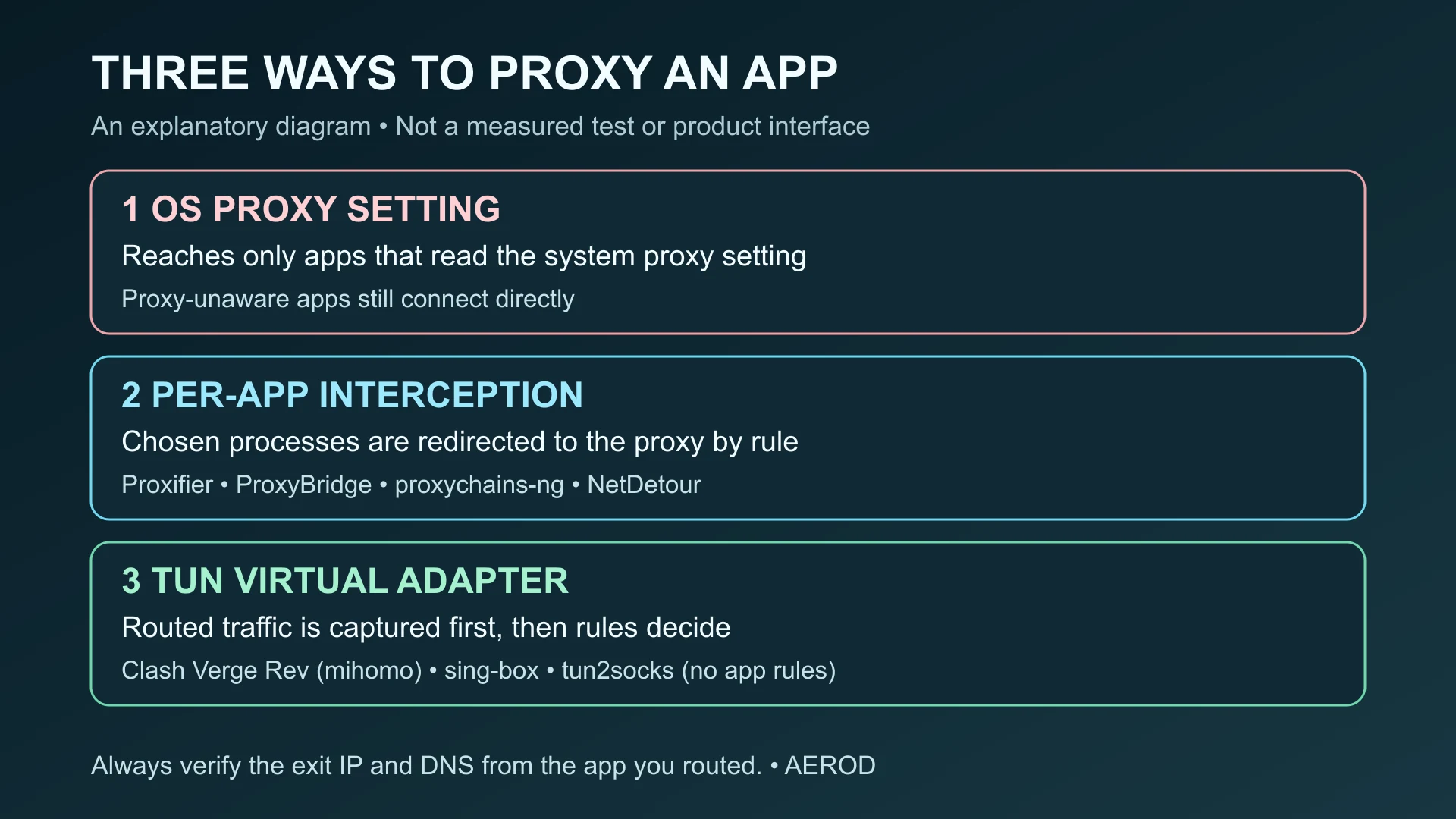
The closest free, open-source Proxifier alternative today is ProxyBridge on Windows, macOS and Linux. On Linux and macOS, proxychains-ng is the long-standing choice for terminal programs. Clash Verge Rev (mihomo) and sing-box can route by process name if you are comfortable with a rule-based config and a TUN adapter. NetDetour, the successor to ProxyCap, is the commercial Windows option. Pick by the Proxifier feature you actually rely on: per-app rules, DNS through the proxy, UDP, chains, or a familiar GUI.
This is a documentation-based comparison. It is not an Aerod hands-on benchmark. Features, licenses and release dates come from each project's official repository or website as of 22 October 2026, and each is linked where it is used. Verify the routing on your own system before relying on any tool. The verification steps below show how.
Quick answer: which alternative fits
On narrow screens, scroll the table horizontally. Keyboard users can focus the table region and use the arrow keys.
| If you need… | Start with | Main trade-off |
|---|---|---|
| A free GUI with per-app rules on Windows, macOS or Linux | ProxyBridge | A young project that changes quickly; needs admin rights and a packet-interception component |
| To run one terminal program through a proxy or chain on Linux or macOS | proxychains-ng | TCP only; works with dynamically linked programs; macOS SIP blocks hooking of system apps |
| Process-name rules plus whole-device capture | Clash Verge Rev (mihomo) or sing-box | Config-file driven (YAML or JSON); TUN mode changes system routing |
| A commercial Windows tool with vendor support | NetDetour (formerly ProxyCap) | Paid; the macOS edition is announced but not yet released |
| Just a tunnel from a virtual adapter to one proxy | tun2socks | No per-application rules; you manage the routes |
| A mature GUI, rule order, chains with failover and support | Keep Proxifier | Paid licence; Windows and macOS need separate licences |
What you are replacing: Proxifier's core features
Proxifier's documentation describes it as a way to make "network applications that do not support working through proxy servers" use a SOCKS or HTTPS proxy or a proxy chain. It can tunnel all of a system's TCP connections or only the ones you select, and resolve DNS names through the proxy. According to the official site, the current versions are 4.14 for Windows (23 April 2025) and 3.15 for macOS (18 September 2025). It has a 31-day trial with no feature limits and a one-time licence that includes free minor-version updates.
Before switching, list which of these you actually use:
- Per-application rules: route one program, leave the rest direct. See the Proxifier rules examples.
- DNS through the proxy: hostnames are resolved remotely instead of by your local resolver. See the Proxifier DNS leak fix.
- Protocol support: SOCKS5 versus HTTPS proxies. See SOCKS5 vs HTTPS in Proxifier.
- Chains and redundancy: more than one proxy in sequence, or fallback when one is down.
- UDP: games, voice, QUIC/HTTP/3. Proxifier's documentation describes TCP tunnelling. Some alternatives below advertise UDP, but UDP through SOCKS5 also requires the proxy server to support the UDP ASSOCIATE command defined in RFC 1928. A UDP-capable client cannot add UDP to a proxy plan that lacks it.
Proxifier alternatives compared
Release dates are the latest published GitHub releases or vendor version notes, checked on 22 October 2026.
| Tool | Platforms | Per-app rules | UDP | Remote DNS | Interface | Licence | Latest release |
|---|---|---|---|---|---|---|---|
| ProxyBridge | Windows 10+ (64-bit), macOS 13+, Linux | Yes: route, block or allow by process, IP, port, protocol, host | Yes (proxy must support it) | Not documented as an option | GUI and CLI | MIT | Windows 4.2.0 (17 Oct 2026), macOS 4.1.0 (18 Oct 2026), Linux 4.0.0 (21 Oct 2026) |
| proxychains-ng | Linux, BSD, macOS, Haiku | Per launched command | No (TCP only) | Yes (proxy DNS) | CLI | GPL-2.0 | 4.17 (21 Jan 2024); repository still active |
| proxychains-windows | Windows (Win32, Cygwin/MSYS2) | Per launched command | Not documented | Yes (fake-IP remote resolution) | CLI | GPL-2.0 | 0.6.8 (24 Jun 2020) |
| Clash Verge Rev + mihomo | Windows, Linux, macOS 11+ | Yes: PROCESS-NAME / PROCESS-PATH rules | Via TUN; depends on proxy | Internal DNS module; DNS hijack in TUN | GUI over a YAML config | GPL-3.0 (GUI) | 2.5.8 (9 Oct 2026); mihomo 1.19.33 (21 Oct 2026) |
| sing-box | Cross-platform; process rules on Linux, Windows and macOS | Yes: process_name / process_path (Linux, Windows, macOS) | Via TUN; depends on proxy | Own DNS module (hijack-dns action) | CLI + JSON config | Open source (see repository) | 1.14.3 (9 Oct 2026) |
| tun2socks | Linux, macOS, Windows, FreeBSD, OpenBSD | No | Not documented in the README | Not documented in the README | CLI | MIT | 2.7.0 (12 Jul 2026) |
| NetDetour (formerly ProxyCap) | Windows XP to 11, Windows Server | Customizable rules | Rules can block UDP | Yes (resolve at proxy) | GUI | Commercial | 1.16 |
ProxyBridge: the closest free GUI replacement
The ProxyBridge repository calls the project a "Proxifier alternative". It redirects TCP and UDP traffic from chosen processes through SOCKS5 or HTTP proxies, and can route, block or allow traffic per application. Rules can match processes, IPs, ports, protocols and hostnames with wildcards. There is a process-exclusion option to prevent proxy loops, and rules can be imported and exported as JSON.
- How it works: on Windows it is built on the WinDivert packet library and needs administrator rights. On macOS it uses Apple's Network Extension framework. On Linux it uses Netfilter NFQUEUE with iptables redirection.
- Watch for: three platform releases appeared between 17 and 21 October 2026, so expect fast change. The project warns about fake download sites; install only from the official repository or website. The README says the app contacts
download.interceptsuite.comto check for updates. It does not describe a remote-DNS setting equivalent to Proxifier's, so check DNS behaviour yourself.
proxychains-ng: terminal programs on Linux and macOS
proxychains-ng preloads a library that hooks network calls in dynamically linked programs. You launch the program through it, for example proxychains4 curl https://example.com, and only that process tree is proxied. It supports HTTP, SOCKS4a and SOCKS5 proxies and can mix them in one chain. Chains can run in exact order, dynamically (skipping dead proxies), in random order or round robin. It can also resolve DNS through the chain.
- Limits: the README says it "supports TCP only (no UDP/ICMP etc)". It also calls the approach a hack that can fail with some scripts, daemons and programs that load libraries dynamically.
- On macOS: System Integrity Protection prevents hooking system apps.
- On Windows: the separate proxychains-windows port uses DLL injection and supports SOCKS5 only. Its last release was in June 2020, and its own README warns that anonymity is not guaranteed. Treat it as a legacy option.
Clash Verge Rev and sing-box: process rules plus TUN
Clash Verge Rev is a desktop GUI for the mihomo (Clash Meta) core, with a system-proxy mode and a TUN (virtual adapter) mode. The mihomo rules reference includes PROCESS-NAME and PROCESS-PATH rules, with wildcard and regex variants. A rule such as PROCESS-NAME,python.exe,MyProxy sends that program's connections to a named proxy.
System-proxy mode only reaches apps that honour the operating system's proxy setting. For proxy-unaware programs, use TUN mode. According to the mihomo TUN documentation, auto-route routes global traffic into the TUN interface, and dns-hijack redirects matching DNS queries to mihomo's internal DNS. On Windows, strict-route adds firewall rules to block DNS leaks from multi-homed resolution. The same page notes it can break some applications, such as VirtualBox.
sing-box route rules offer the same idea with process_name and process_path, "only supported on Linux, Windows, and macOS". It is configured in JSON and suits people who already manage configuration files. Neither tool is a click-to-add-one-app GUI like Proxifier. The extra capture also means more to audit.
NetDetour (formerly ProxyCap): the commercial Windows option
The ProxyCap website now states that ProxyCap "has been superseded by NetDetour". NetDetour supports Windows XP through Windows 11 and Windows Server, plus HTTP and SOCKS proxies, proxy chains and native SSH tunnels. It offers customizable rules, can resolve names at the proxy, and has rules that can block UDP. The current version listed is 1.16, and a macOS CLI edition is announced. The homepage does not state a price, so check the vendor's purchase page.
tun2socks: a building block, not a Proxifier clone
tun2socks uses the gVisor network stack to send traffic from a virtual interface through an HTTP, SOCKS, Shadowsocks, SSH or relay proxy. It runs on Linux, macOS, Windows, FreeBSD and OpenBSD and has a gateway mode for other devices. It has no per-application rules: what goes through the proxy depends on the routes you configure. Choose it when you want all routed traffic proxied and can manage routing yourself.
Mapping Proxifier settings to each alternative
| Proxifier setting | Closest equivalent |
|---|---|
Proxification rule for app.exe | ProxyBridge process rule; mihomo PROCESS-NAME; sing-box process_name; proxychains-ng launch prefix |
| Default rule: Direct | A ProxyBridge Direct rule; mihomo final MATCH,DIRECT; sing-box final pointing to a direct outbound |
| Default rule: Block (see Proxifier Default Block) | ProxyBridge block rule; mihomo MATCH,REJECT; sing-box reject rule action |
| Resolve hostnames through proxy | proxychains-ng proxy DNS; mihomo DNS module with dns-hijack; NetDetour resolve at proxy |
| Proxy chain | proxychains-ng chain list; NetDetour chains; outbound chaining in mihomo or sing-box configs |
| Localhost / proxy-client exception to avoid loops | ProxyBridge process exclusion; a Direct rule for the proxy client's own process in mihomo or sing-box |
Rule syntax differs between versions, so check the current reference for your version before copying a rule.
Verify any alternative before trusting it
- Check the exit IP from the target app, not just the browser. For browser traffic, compare Aerod IP Lookup with and without the tool. For a CLI program, run a request through the same process the rule targets.
- Check DNS separately. A changed IP does not prove names are resolved remotely. DNS leak tests explained covers what a resolver test can and cannot show.
- Check WebRTC and IPv6 in browsers with the WebRTC leak test and the broader browser leak test guide.
- Confirm unmatched traffic does what you intended: direct for selective routing, blocked for a strict policy.
- Watch for loops. If the proxy client itself is captured, connections can loop. Exclude it or route it Direct.
Download and permission safety
- Install from the official repository or vendor site only. ProxyBridge explicitly warns about fake download sites.
- Per-app interception and TUN modes need administrator or root rights, kernel-level packet components or a system network extension. Approve them only for tools you trust.
- Avoid "free Proxifier key" or cracked downloads. Beyond the licence issue, a routing tool sees all of the traffic it proxies.
- A proxy client is not a VPN kill switch. Traffic outside its rules, or while it is stopped, may go direct.
When it is worth keeping Proxifier
Keep Proxifier if you depend on its first-match rule list in a GUI, its documented chains and redundancy, the Windows Service mode, or one vendor across Windows and macOS. If Proxifier itself is the problem rather than its price, work through Proxifier not working and the Proxifier setup guide before migrating.
FAQ
Is there a free alternative to Proxifier?
Yes. ProxyBridge is a free, MIT-licensed tool for Windows, macOS and Linux with per-application rules for SOCKS5 and HTTP proxies. On Linux and macOS, proxychains-ng is a free option for running individual terminal programs through a proxy or chain.
What can I use instead of Proxifier on Linux?
proxychains-ng proxies individual dynamically linked programs over TCP and can resolve DNS through the chain. ProxyBridge has a Linux build that uses Netfilter NFQUEUE. Clash Verge Rev with mihomo, or sing-box, can route by process name through a TUN adapter.
Is there a Proxifier alternative for Mac?
ProxyBridge supports macOS 13 and later through Apple's Network Extension framework. proxychains-ng also runs on macOS, but System Integrity Protection prevents it from hooking system apps. Proxifier itself also has a macOS version.
Can Proxifier alternatives proxy UDP?
Some can. ProxyBridge advertises TCP and UDP routing, and TUN-based tools work at the IP layer, so they can capture UDP as well as TCP. The proxy server must still support UDP, for example SOCKS5 UDP ASSOCIATE. proxychains-ng is TCP only.
What happened to ProxyCap?
The ProxyCap website says ProxyCap has been superseded by NetDetour, a commercial Windows proxy client with rules, proxy chains, SSH tunnels and DNS resolution at the proxy.